



Affiliate Disclosure
This article may contain affiliate links. If you purchase through these links, we may earn a small commission at no additional cost to you. As an Amazon Associate, we earn from qualifying purchases.
Buying a robot vacuum sounds like a shortcut to cleaner floors until you discover how much brush cleaning, floor preparation, and mop care it still needs. The real question is how much work remains after each cleaning cycle.
This Roborock Qrevo 2 Pro robot vacuum review examines hard floors, carpets, hair pickup, mopping, obstacle avoidance, dock maintenance, and value. Its automatic mop removal is especially interesting for homes where hard flooring meets carpet.
I have not personally tested this model. This researched review draws on the exact US Amazon listing, Roborock documentation, and published tests from Tom’s Guide and WIRED. Their results differ, and some published specifications conflict, so I separate manufacturer claims from observations and explain those limits. Let’s start with who should consider buying it.
Roborock Qrevo 2 Pro Robot Vacuum: Quick Verdict
The Qrevo 2 Pro is worth considering for mixed flooring and regular maintenance cleaning. Automatic mop removal helps keep damp pads off carpets, while the dock handles several routine chores. Published cleaning results vary, particularly for hair, and owners still need to prepare floors and maintain the tanks, brushes, and filters.

Roborock Qrevo 2 Pro: Everyday Cleaning With Less Manual Work
✔ Automates vacuuming, mopping, and several dock maintenance tasks.
✔ Can leave its mop assembly at the dock before cleaning carpets.
✘ Still needs floor preparation and regular owner upkeep.
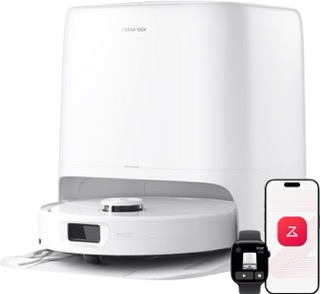
Color options: Available in White and Black. Select your preferred color on the Amazon product page before ordering.
What Is the Qrevo 2 Pro, and Which Version Are You Buying?
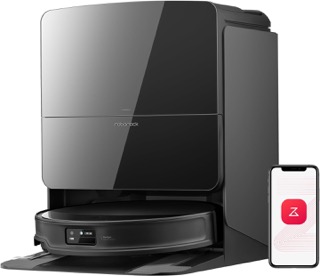
The Roborock Qrevo 2 Pro robot vacuum and mop covered here is the US Amazon product associated with ASIN B0GXFHY7Y2. Its manual identifies the robot as RRE0QUI and the dock as EWFD63LRR.
The core package includes the robot, multifunctional dock, dock base, power cable, rotating mop module, and user manual. Confirm the selected color and package before ordering because listing labels can vary.
The Qrevo 2 Pro is a separate product from the older Qrevo Pro, Qrevo S Pro, and Qrevo Curv 2 Pro. Similar names do not mean identical suction ratings, brushes, docks, or carpet handling.
Our Roborock model comparison helps put the wider lineup into context. If you arrived here while researching the S Pro, the Qrevo S Pro review covers that different model.
Qrevo 2 Pro Specifications
| Specification | Qrevo 2 Pro |
|---|---|
| Cleaning system | Vacuum and dual spinning mops |
| Maximum suction | 20,000 Pa, manufacturer rating |
| Navigation | PreciSense LiDAR |
| Carpet handling | Automatic mop removal and carpet cleaning modes |
| Dock functions | Dust emptying, robot water refilling, mop washing, drying, and charging |
| Robot dimensions | 13.86 × 13.78 × 3.80 inches |
| Combined robot and dock dimensions | 15.83 × 19.45 × 17.72 inches |
| Battery | 5,200 mAh |
| Advertised maximum runtime | Up to 253 minutes |
| WiFi connection | 2.4 GHz |
The specifications above were checked against Roborock’s US Qrevo 2 Pro product information, the exact Amazon listing, and the matching user manual.
A specification discrepancy needs attention. Roborock’s US listing specifies 20,000 Pa, while Tom’s Guide’s review lists 25,000 Pa and different battery and washing temperature figures. I could not establish whether those differences reflect an error or another configuration. Its cleaning results below are attributed observations, not a verified benchmark for this exact Amazon package.
Design and Dock Size: Will It Fit Your Home?
The robot is approximately 3.8 inches tall. Measure the lowest clearance beneath your furniture rather than assuming it will fit under every sofa or cabinet.
If furniture clearance is a deciding factor, include the Roborock Saros 10R in your comparison and check the dimensions against your actual furniture.
The dock needs more space than its physical footprint suggests. You must be able to remove the water tanks, access the dust bag, and leave a clear route for the robot.
The matching manual specifies a reserved dock area of at least:
- 1.2 meters deep
- 0.82 meters high
- 0.42 meters wide
These measurements describe the required installation space, not extra clearance to add on every side.
Place the dock against a wall on a hard, flat surface with suitable WiFi coverage. Carpet or a soft mat can affect stability and docking.
💡 Tip
Measure the installation area with the water tanks lifted out. A shelf directly above the dock may leave enough space for the station but make refilling inconvenient.
Cleaning Performance on Hard Floors, Carpets, and Hair
Hard Floors and Everyday Debris
Tom’s Guide’s published cleaning tests used a 6 × 3-foot area with measured quantities of cereal, flaxseeds, and hair.
| Debris | Hardwood pickup | Carpet pickup |
|---|---|---|
| Rice Krispies | 92.5% | 76.5% |
| Flaxseeds | 92% | 51% |
| Hair | 60% | 48% |
Test context: The publication used 20 grams each of cereal and flaxseeds and 5 grams of hair. Its review was published on August 28, 2026. Because its listed specifications differ from the US product documentation, these figures require the qualification explained above.
Within that test, hard floor pickup was stronger than carpet pickup, and hair was the weakest category. This is useful evidence to consider, but it does not establish what every owner will experience.
For routine crumbs and debris, the buying case is more persuasive than a promise of complete deep cleaning. Cleaning settings, debris, floor texture, and the number of passes all matter.
Carpets and Rugs
WIRED reported effective cat hair removal on carpet but also found a ball of long human hair near a corner. Its experience was more favorable than the hair results in Tom’s Guide’s testing.
The difference is a reason to read beyond suction specifications. A higher advertised pressure does not establish how effectively a robot will collect embedded debris.
For a home with occasional rugs, the robot can serve as a regular maintenance tool. For extensive carpeting or stubborn embedded hair, keep a conventional vacuum in the cleaning routine. Our Bissell CleanView Compact Turbo review covers one upright option to assess alongside a robot.
Pet Hair and Long Hair: Does Less Tangling Mean Better Pickup?
The Qrevo 2 Pro uses a DuoDivide main brush and an anti-tangle side brush. These features address hair wrapping around the brushes.
Reduced tangling and successful pickup are different outcomes. A brush can remain relatively clear while hair remains on the floor or gathers elsewhere.
For frequent light cleaning, less brush wrapping can be convenient. For heavy shedding, assess actual pickup evidence and your willingness to supplement the robot with manual vacuuming.
💡 Tip
During your first cleaning cycles, check carpet edges, corners, wheels, and brushes. Use those observations to adjust cleaning frequency and identify areas needing an extra pass.
Mopping and Carpet Protection in a Mixed Floor Home
Routine Marks, Sticky Residue, and Edges
The Qrevo 2 Pro has dual rotating mop pads. Roborock specifies speeds up to 200 RPM and FlexiArm edge mopping that reaches approximately 1.85 mm from an edge. That distance is the stated remaining gap, not how far the mop extends.
Tom’s Guide reported removing its tested soy sauce, mayonnaise, and mud messes after two passes. WIRED found spill cleaning less convincing, with sticky residue remaining during its testing.
Treat mopping as regular floor maintenance with the possibility of repeated passes or manual spot cleaning. Do not assume every dried stain will disappear in one run.
For a different mopping design, our Eufy E25 review discusses a roller mop alternative.
⚠ Warning
Do not use the robot as a liquid extraction machine. Pick up substantial liquid spills before running a normal cleaning cycle.
Automatic Mop Removal: When Is It Useful?
The Qrevo 2 Pro can leave its mop assembly at the dock before vacuuming carpets and retrieve it for mopping. Roborock says this function must be enabled in the app.
Removing the mops provides a different carpet strategy from simply lifting damp pads above the surface.
In a hypothetical home with carpeted bedrooms and a tiled kitchen, a compatible cleaning routine can vacuum the bedrooms without attached mops, then retrieve the assembly before mopping the kitchen.
The tradeoff is additional dock travel and potentially longer cleaning cycles. Check the app settings and watch an initial run to confirm the routine suits your layout.
💡 Tip
Enable mop removal and review the carpet settings during setup. Do not assume the preferred carpet routine is active by default.
Roborock Qrevo 2 Pro: A Useful Option for Mixed Flooring
✔ Detaches its mop assembly for suitable carpet cleaning routines.
✔ Retrieves the assembly for hard floor mopping.
✘ Extra dock trips can extend the cleaning session.
Navigation and Obstacle Avoidance: How Much Floor Preparation Is Needed?
The Qrevo 2 Pro combines LiDAR navigation with Reactive Tech obstacle avoidance. Mapping rooms and recognizing objects are separate jobs: a robot can follow an organized route while still struggling with something small in its path.
WIRED reported difficulty with small toys and flat furniture legs. Tom’s Guide also observed collisions.
Remove cables, socks, small toys, and fragile objects before scheduled cleaning. The manual recommends clearing wires and loose items rather than relying entirely on the sensors.
Use restricted areas in the app for recurring trouble spots. If obstacle handling is a major purchase priority, compare the evidence in our Roborock Saros 20 review before choosing.
💡 Tip
Watch the first complete cleaning run. Mark problem areas in the app and adjust loose cables or lightweight objects before relying on unattended schedules.
App Controls, Battery Life, and Daily Scheduling
The Roborock app manages maps, room selection, schedules, cleaning preferences, and restricted areas. Physical controls support basic operation, but the app is central to customization.
The robot connects through 2.4 GHz WiFi. A dual-band router is not automatically a problem; it needs an available, compatible 2.4 GHz connection.
Amazon lists a maximum runtime of 253 minutes. This is an advertised figure, not a measured result from this review. Stronger suction, carpet cleaning, and repeated passes can change practical coverage.
The manual describes automatic return for charging and resumption of unfinished cleaning. That behavior matters for larger homes, where a single uninterrupted run may be less important than completing the planned job.
💡 Tip
Start with a simple room schedule. Add stronger suction or extra passes only where your floors need them, then check whether the routine finishes within your preferred time window.
Dock Maintenance and Running Costs: What Work Remains?
The dock reduces several recurring chores, but owners still handle water, consumables, and cleaning the equipment.
What the Dock Handles
The dock can:
- Empty the robot’s dustbin.
- Refill the robot’s onboard water supply.
- Wash and dry the mop pads.
- Charge the robot.
Roborock advertises mop washing up to 149°F and warm air drying at 113°F. The washing figure refers to the stated heater output conditions, not a guarantee that every part of the mop reaches that temperature.
Its claim of up to 65 days without manual dust emptying concerns dust collection. It does not mean water tanks or the washing system can be ignored for that period.
What the Owner Still Does
| Owner task | Practical expectation |
|---|---|
| Clean water tank | Refill as needed |
| Dirty water tank | Empty and clean regularly |
| Cleaning tray and tray filter | Remove debris and buildup |
| Main brushes | Clean every two weeks; manual suggests replacement every 6 to 12 months |
| Washable filter | Clean every two weeks; manual suggests replacement every 6 to 12 months |
| Mop cloths | Clean as needed; manual suggests replacement every 1 to 3 months |
| Sensors and charging contacts | Clean according to the manual |
| Dust bag | Replace when needed |
Replacement intervals are the manual’s guidance, not a guarantee that every household will wear parts at the same rate.
Allow washed filters and the dustbin to dry for at least 24 hours and until completely dry before reinstalling them. Use only the cleaning solution recommended by Roborock and follow the stated dilution instructions.
For ongoing costs, check compatible bags, filters, mop cloths, brushes, and cleaning solution before buying. A dependable annual total cannot be calculated without verified accessory prices and assumptions about replacement frequency.
The robot can handle regular floor maintenance while a broader deep cleaning routine covers tasks outside its reach.
⚠ Warning
Do not reinstall a damp filter or add disinfectant to the water system. Follow the matching model’s manual rather than generic robot mop advice.
Roborock Qrevo 2 Pro: Automate the Repetitive Chores
✔ Handles dust transfer, robot water refilling, and mop washing.
✔ Dries the pads after washing to reduce manual handling.
✘ Water tank care and replacement supplies remain your responsibility.
Read more: Considering a simpler robot with an emptying dock? See our Roborock Q7 M5 Plus review.
Qrevo 2 Pro vs Qrevo S5V: Which Makes More Sense?
The buying question in this Roborock Qrevo 2 Pro review is whether its carpet handling and dock features justify the price difference for your home.
On October 5, 2026, Roborock’s US pages displayed $549.99 for the Qrevo 2 Pro and $499.99 for the Qrevo S5V. That was a $50 difference at the time of checking. Amazon prices and promotions may differ.
| Feature | Qrevo 2 Pro | Qrevo S5V |
|---|---|---|
| Manufacturer-rated suction | 20,000 Pa | 12,000 Pa |
| Main brush | DuoDivide | DuoDivide |
| Advertised anti-tangle system | Dual system | Triple system |
| Edge mopping | FlexiArm | FlexiArm |
| Carpet strategy | Automatic mop removal and carpet settings | 10 mm mop lifting |
| Mop washing | Heated washing | Automatic washing |
| Mop drying | Warm air | Warm air |
| Navigation | LiDAR | LiDAR |
| Obstacle avoidance | Reactive Tech | Reactive Tech |
| Official US price checked | $549.99 | $499.99 |
A reversible side brush is a vacuuming feature, so it should not be confused with the mop’s edge reach.
The Qrevo 2 Pro’s automatic mop removal is the clearest reason to consider paying more if damp pads near carpet are a concern. Its higher suction rating alone does not establish better real-world pickup.
The S5V may be sufficient if its mop lifting approach fits your flooring and its actual purchase price is more attractive. Our Qrevo S5V review covers that alternative in more detail.
For an existing S5V owner, identify a specific problem the newer model would solve before upgrading. The two machines overlap in their basic cleaning and dock functions.
Read more: Compare other cleaning designs in our robot vacuum and mop comparison.
Roborock Qrevo 2 Pro Robot Vacuum: Pros and Cons
PROS & CONS
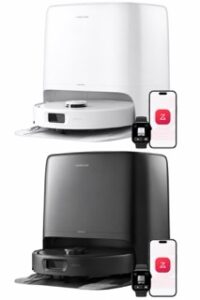
roborock Qrevo 2 Pro Robot Vacuum and Mop (20,000Pa Suction)
Pros
✔ Automatic mop removal: A useful feature for cleaning carpets without attached damp pads.
✔ Dual rotating mops: Offers active mopping for routine hard floor maintenance.
✔ Flexible cleaning schedules: Room selection and app settings help tailor everyday cleaning.
✔ Manageable robot height: Worth considering where furniture clearance accommodates its 3.8-inch profile.
✔ Multifunctional dock: Reduces manual dustbin emptying, robot water refilling, and mop care.
Cons
✘ Mixed hair pickup evidence: Published results do not support a blanket promise for heavy shedding.
✘ Small obstacles still need attention: Floor preparation remains part of ownership.
✘ Recurring maintenance and supplies: Tanks, filters, brushes, bags, and mop cloths need care.
✘ Conflicting review specifications: Some published results cannot be confidently matched to this exact US package.
Final Verdict: Should You Buy the Qrevo 2 Pro?
The Roborock Qrevo 2 Pro robot vacuum is worth considering for a home with hard floors, some carpeting, and a need for frequent automated cleaning. Automatic mop removal and a multifunctional dock make the strongest buying case.
I would be more cautious if heavy carpet hair pickup or dependable avoidance of small clutter is your main priority. Published results vary, and the specification differences between sources limit direct comparisons.
Choose it if its carpet routine solves a real problem and you are comfortable maintaining the water tanks, brushes, filters, and mop pads. Consider the S5V if its simpler carpet approach meets your needs at a better price.
Before ordering, confirm the exact package, available dock space, current price, and return terms. Those checks are more useful than choosing solely by the largest suction number.
Frequently Asked Questions
Can the Roborock Qrevo 2 Pro Robot Vacuum and Mop Work Without WiFi?
Basic cleaning is available through physical controls. App setup requires compatible 2.4 GHz WiFi, and connected features such as scheduling, room selection, and advanced customization depend on the app.
Can You Use Your Own Floor Cleaner in the Qrevo 2 Pro?
Use cleaning solution recommended by Roborock at the specified dilution. The manual warns against disinfectant and excessive cleaning solution. Do not assume a cleaner approved for your flooring is also approved for the robot’s water system.
Can the Qrevo 2 Pro Clean Multiple Floors?
The reviewed documentation did not establish a reliable maximum number of saved floor maps. If separate floor mapping is essential, confirm current support and operating instructions with Roborock before buying. Do not assume the robot can move between levels by itself.
Does the Qrevo 2 Pro Need a Plumbing Connection?
The reviewed package uses removable clean and dirty water tanks and does not require a permanent plumbing connection. Owners fill the clean water tank and dispose of dirty water manually.
Why Do Qrevo 2 Pro Listings Show Different Suction Ratings?
Roborock’s US product page lists 20,000 Pa, while Tom’s Guide’s review lists 25,000 Pa. The reason for that discrepancy was not established. Use the exact ASIN and matching manufacturer documentation rather than assuming the figures describe identical hardware.
Are Qrevo 2 Pro Accessories Compatible With Older Qrevo Models?
Check each accessory’s compatibility list for the exact model. A general “Qrevo” label isn’t enough to confirm that brushes, filters, mop cloths, or other parts will fit.













Roborock Q10 S5 Plus Review: Is the Auto Empty Dock Worth It?
Tired of emptying the robot’s dustbin after every cleaning run? This…
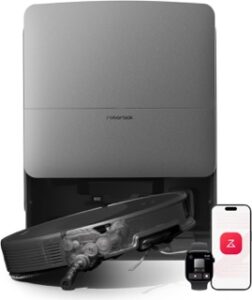
Roborock Qrevo 2 Pro Robot Vacuum Review: Worth Buying?
How much cleaning work will this robot actually take off your hands? O…
Roborock Qrevo Curv 2 Flow Robot Vacuum Review: Worth Buying?
Still deciding whether a roller mop is worth the upgrade? This Roboroc…
Roborock Saros 20 Robot Vacuum Review: Is It Worth Buying?
Still rescuing your robot from thresholds and tangled hair? This Robor…
O-Cedar EasyWring RinseClean Spin Mop System Review: Worth Buying?
Does separate clean water make mopping easier? Explore the O-Cedar Eas…
O-Cedar EasyWring Spin Mop Review: Is It Worth Buying?
Does easier wringing make the O-Cedar EasyWring spin mop worth buying?…
Roborock Saros 10R Robot Vacuum Review: Is It Worth the Premium Price?
Is the Roborock Saros 10R worth its premium price? This in-depth revie…

Roborock Qrevo S Pro Robot Vacuum Review: Is It Worth Buying?
The Roborock Qrevo S Pro promises less daily vacuuming and mop care. T…

10 Best Roborock Robot Vacuum Models: Which Fits Your Home?
Which Roborock robot vacuum fits your home? Compare 10 models across t…
5 Best Microfiber Cleaning Cloths: Which Should You Buy?
Find the best microfiber cleaning cloth for your home. Compare five pi…
USANOOKS Microfiber Cleaning Cloth Review: Is the Grey 12 Pack Worth It?
Considering the USANOOKS grey 12 pack? Explore its size, color choices…

MR.SIGA Microfiber Cleaning Cloth Review: Is the 12 Pack Worth It?
Are MR.SIGA microfiber cleaning cloths worth a spot in your kitchen? T…